The software PrepVia runs on
The PrepVia app: your stock from the supplier to Amazon and every channel
PrepVia is a prep center and 3PL in Miami that runs on its own software. You log in to the PrepVia app, the same one the warehouse team works in: plan each shipment to Miami, see what arrived, send stock to Amazon FBA and ship orders from Shopify, eBay and the other channels you sell on, all from one inventory.
Measured in the app: a median of 30.2 hours from shipment created to carrier pickup, and a peak week of 18,080 units in 15 shipments. Verified on September 23, 2026.

Self-serve onboarding. A call is optional. The same app also installs from the Microsoft Store on Windows 10 and 11.
How the PrepVia app follows your stock
Each step of your stock has a screen in the app. Here they are in the order your stock moves.
Step 1: Before it ships
Plan the shipment to Miami
Every shipment to the Miami warehouse starts in Send to PrepVia: you choose where the stock goes next, add the products and say how it travels, or send your supplier a link to fill in. For Amazon FBA, the app checks each item's Amazon eligibility when you submit and creates your FBA draft from the eligible items. With Pre-Fulfillment Requests, a customer order travels with the inbound and is processed once the shipment is received.
- Send to PrepViaThe inbound plan for the stock you ship to Miami: the destination, the products and the carrier, or your supplier's link.
- Supplier linkYour supplier adds the carrier, the tracking for each box and the packing list of your shipment, without a PrepVia login.
- AI document readingAI Extract: the AI reads an invoice or packing slip, as a PDF or a photo, into SKUs, UPCs, names and quantities. You check the list before saving.
Step 2: At the dock
See what arrived
Receiving and inspection happens product by product: the team records what was received against what you sent, and the difference. When the shipment closes, the warehouse receipt is a PDF in the app, and if the team needs something from you, the shipment says so. Storage is billed by the day on the space your stock uses, so the cost drops as units ship.
- Shipment trackingShipments to PrepVia: every shipment on its way to Miami, with expected against received per product and a warehouse receipt in PDF once it closes.
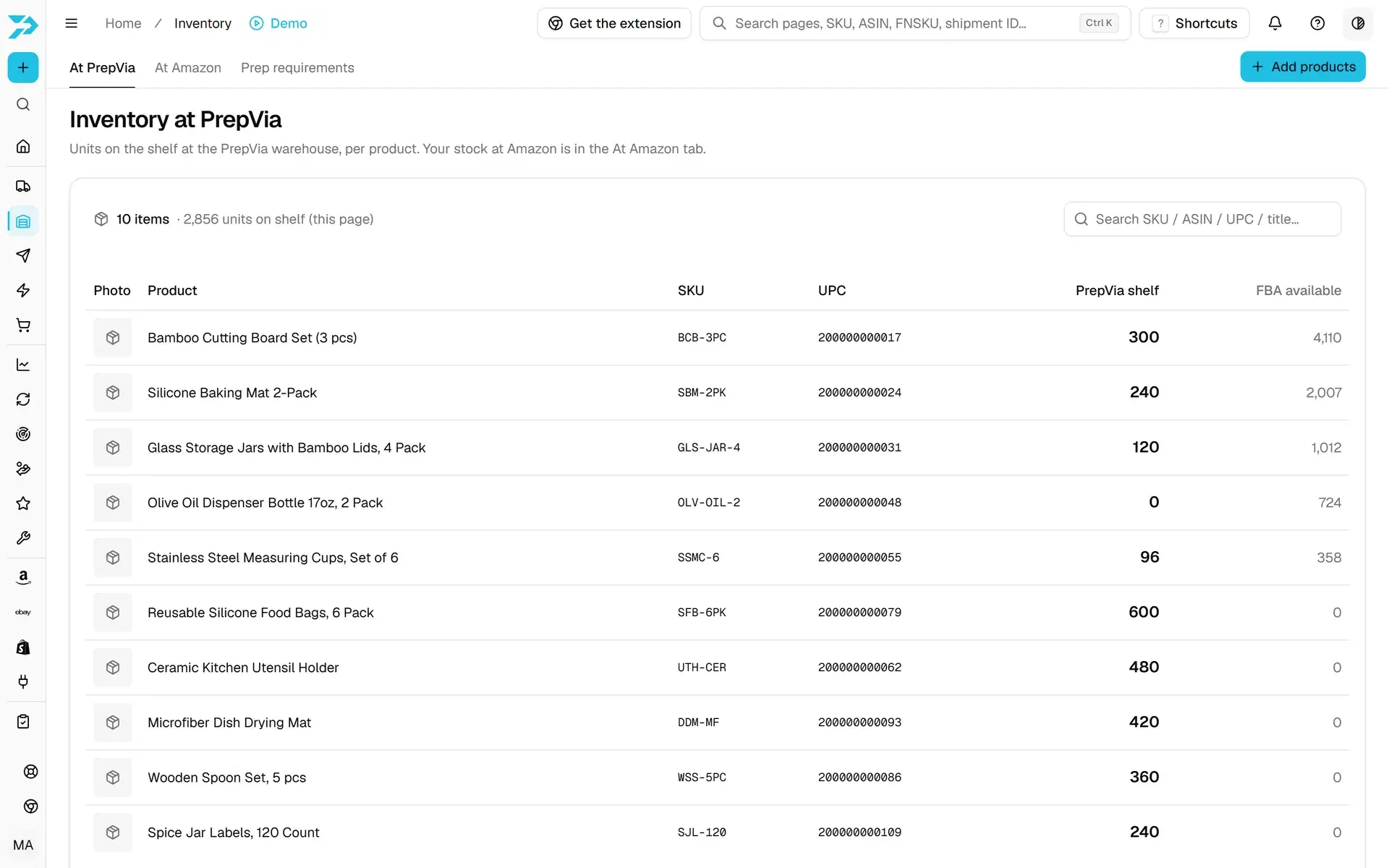
- InventoryYour units on the shelf at PrepVia and your stock at Amazon, per product, with products added from a file, a spreadsheet or an ASIN.
Questions about connecting your Amazon account?
Pricing is quoted per account on a free 15-minute call.
Step 3: To Amazon
Send stock to Amazon
In Send to Amazon you pick the items and units at PrepVia and add prep notes. PrepVia builds the shipment plan through its own SP-API integration, picks the placement option, sends the box contents and books the freight, and each request moves through Working, Ready to ship, Shipped, In transit, Receiving and Closed. In Prep requirements you change the prep category Amazon has on file for a listing, and the change is saved on your Amazon account.
- Send to AmazonAsk PrepVia to ship your stock to Amazon FBA, and follow each request until Amazon receives it.
- Prep requirementsThe prep Amazon has on file for each FBA listing, changed from the app and saved on your Amazon account.
- Amazon AWDCases prepped and labeled in Miami and shipped to Amazon Warehousing and Distribution, with the AWD shipment created in the app.
- Amazon FBMFBM Fulfillment: merchant-fulfilled Amazon orders, with Amazon's shipping quotes, the label and the confirmation on Amazon.
- Amazon partnered carrierSPD, LTL and FTL freight to Amazon on Amazon's partnered program, when Amazon offers it, billed to your seller account.
FastLane 35H: 35 hours end to end, from check-in at PrepVia to Amazon FBA delivered status, or the prep is free. PrepVia is Amazon SPN Certified, listed in the Amazon Service Provider Network.
Step 4: To your customers
Ship orders from the same stock
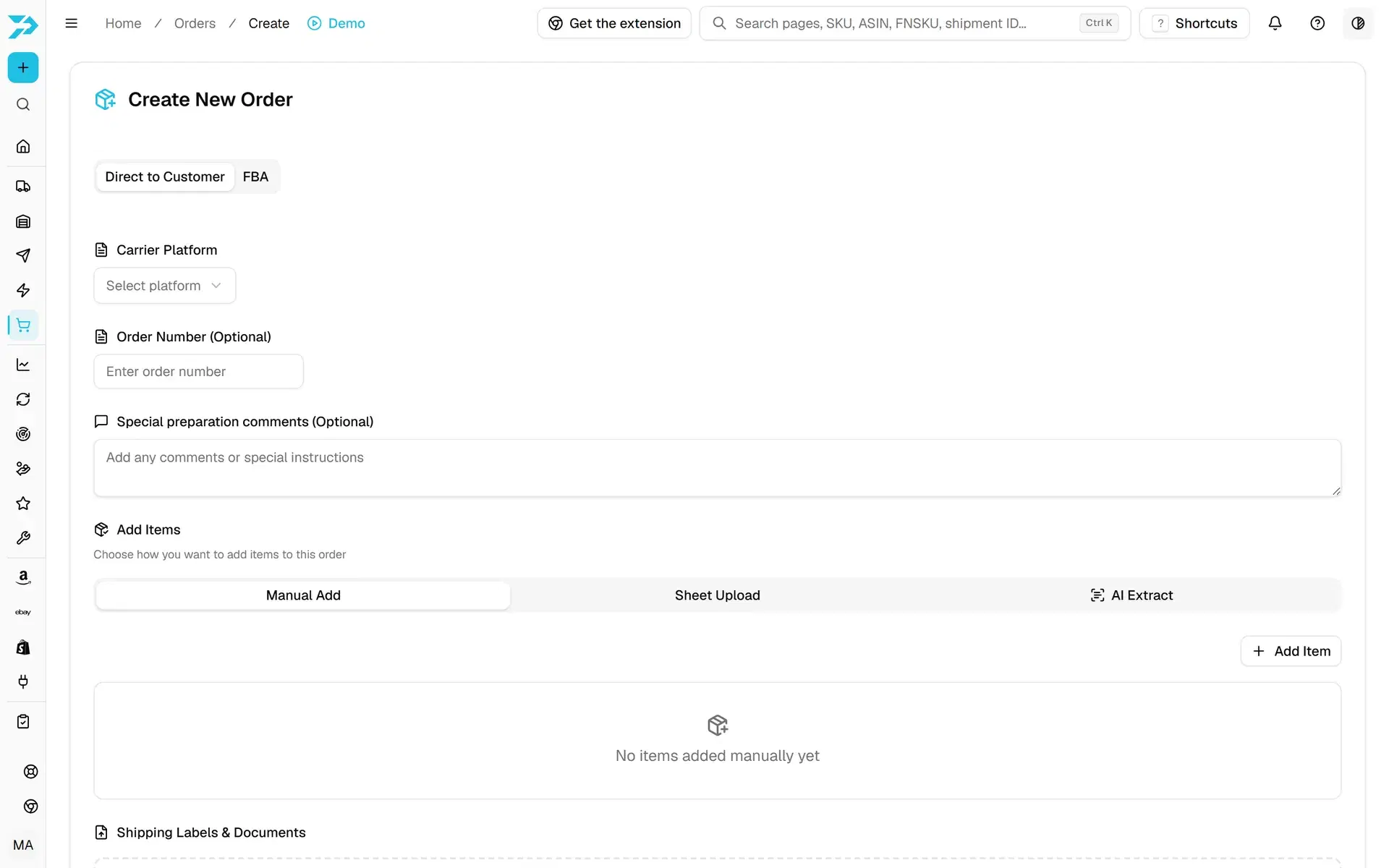
The same stock in Miami ships to your own customers. Shopify orders with your linked products come in every 15 minutes, eBay orders from the US with your linked products come in through your eBay connection, and merchant-fulfilled Amazon orders come in through FBM Fulfillment, above. For Walmart, TikTok Shop, Etsy, WooCommerce and other channels, you create the order in Orders, by hand, by spreadsheet or with AI Extract, and upload the label.
- OrdersThe customer and FBA orders PrepVia picks, packs and ships from your stock, created in the app or coming in from Shopify and eBay.
- D2C fulfillmentCustomer orders picked, packed and shipped from your stock, with the carrier you choose.
- Shopify integrationThe PrepVia app on the Shopify App Store: the Shopify orders with your linked products come into PrepVia, you upload the label, and the team ships them from the Miami warehouse.
- eBay integrationConnect your eBay account in the PrepVia app: the eBay orders with your linked products come in, and PrepVia ships them from your stock in Miami.
Channels PrepVia serves
No connection to these channels: you create their orders in Orders.
- WalmartWFS prep by Walmart's rules, and Walmart orders shipped from your stock. The Walmart API is in the researching stage.
- TikTok ShopPrep and labeling for TikTok Shop fulfillment, and orders shipped from your stock. The TikTok Shop API is in the researching stage.
- EtsyEtsy orders packed and shipped as parcels from your stock, created in the PrepVia app.
- WooCommerceWooCommerce store orders packed and shipped as parcels from your stock, created in the PrepVia app.
Not sure which screens your team needs?
Pricing is quoted per account on a free 15-minute call.
Step 5: Your numbers
Sales, stock and money
Connect your Amazon seller account and every tool here except Pallet Builder and Billing works from your own Amazon data: how many units to send next, what each product earns after Amazon's fees, the units Amazon received short of what PrepVia shipped, and what is worth buying next.
- RestockHow many units to send next, per SKU, from your sales speed and the stock you already have at Amazon and at PrepVia.
- Stuck productsThe Amazon SKUs that stopped selling, sit on too much stock, lost the Buy Box, are stranded, aging or flagged by Amazon, each with what to do.
- Stranded inventoryUnits Amazon holds but cannot sell, with the reason, the time stranded, the removal deadline and the value at risk.
- SalesBest sellers, trends, returns and a monthly forecast from your real Amazon orders.
- Profit / P&LReal profit per product from your Amazon orders, fees and costs.
- ASIN MarginsCosts, Amazon fees and net margin for each ASIN in one table.
- ReimbursementsUnits Amazon received short of what PrepVia shipped: money Amazon may owe you.
- Review RequestsSend Amazon's official "Request a Review" on delivered orders, inside Amazon's allowed window.
- WatchlistWatch any ASIN, even ones you don't stock: its Buy Box, new offers and sales rank, with every change listed.
- DistributionWhere Amazon placed your units across its fulfillment centers, including its own transfers.
- Plan a waveAmazon's placement fees for one product and a plan to ship it in waves. Each plan is a real plan in your Amazon account.
- Delivery speedWhere your units are at Amazon and an estimate of the days they take to reach buyers in each US region.
- Pallet BuilderStack your boxes on standard 48 × 40 in pallets and preview the load in 3D.
- AnalyzerUpload a supplier price list and see profit and ROI for every product, with your own PrepVia prep pricing.
- Product IntelligencePaste a UPC or ASIN: sales rank, sellers, Buy Box, FBA fee, dimensions, stock and FBA eligibility in one place.
- BillingEvery PrepVia invoice in the app, storage measured day by day, card payment in the app or a wire, and your agreed prices.
Restock, Sales, Profit / P&L, ASIN Margins, Reimbursements and Distribution carry the Beta label in the app. Each page says why.
Step 6: The connections
Integrations
Four integrations connect to the PrepVia app: Amazon SP-API, Shopify, eBay and QuickBooks. Shopify and eBay bring your orders in, as shown above. The Amazon connection is PrepVia's own SP-API integration: you approve it in Seller Central and can disconnect it any time. QuickBooks receives the PrepVia charges you pay in the app, one way, and Billing shows your PrepVia invoices and your storage by day.
All four are side by side on the Integrations page.
Want to see the app on one of your shipments?
Pricing is quoted per account on a free 15-minute call.
Latest releases and roadmap
What shipped recently, and the channel APIs PrepVia is researching.
FastLane 35H
35 hours end to end, from check-in at PrepVia to Amazon FBA delivered status, or the prep is free.
AI Document Reading
Upload an invoice or packing slip, as a PDF or a photo. The AI lists the SKUs, UPCs, names and quantities for you to check.
Add Inventory from a file
Upload a file and the AI reads each product's SKU, name and UPC. You review the list and create the products yourself.
FBM Fulfillment
Merchant-fulfilled (FBM) Amazon orders in the app: shipping quotes, labels and the shipment confirmation on Amazon.
Restock
How many units to send next, per SKU, from your sales speed and stock, with an optional daily email when a SKU drops below your days of cover.
Walmart API
TikTok Shop API
Pallet Builder
Stack your boxes on standard 48 × 40 in pallets and preview the load in 3D.
See real screens from the app
Swipe through real screens of the PrepVia app.
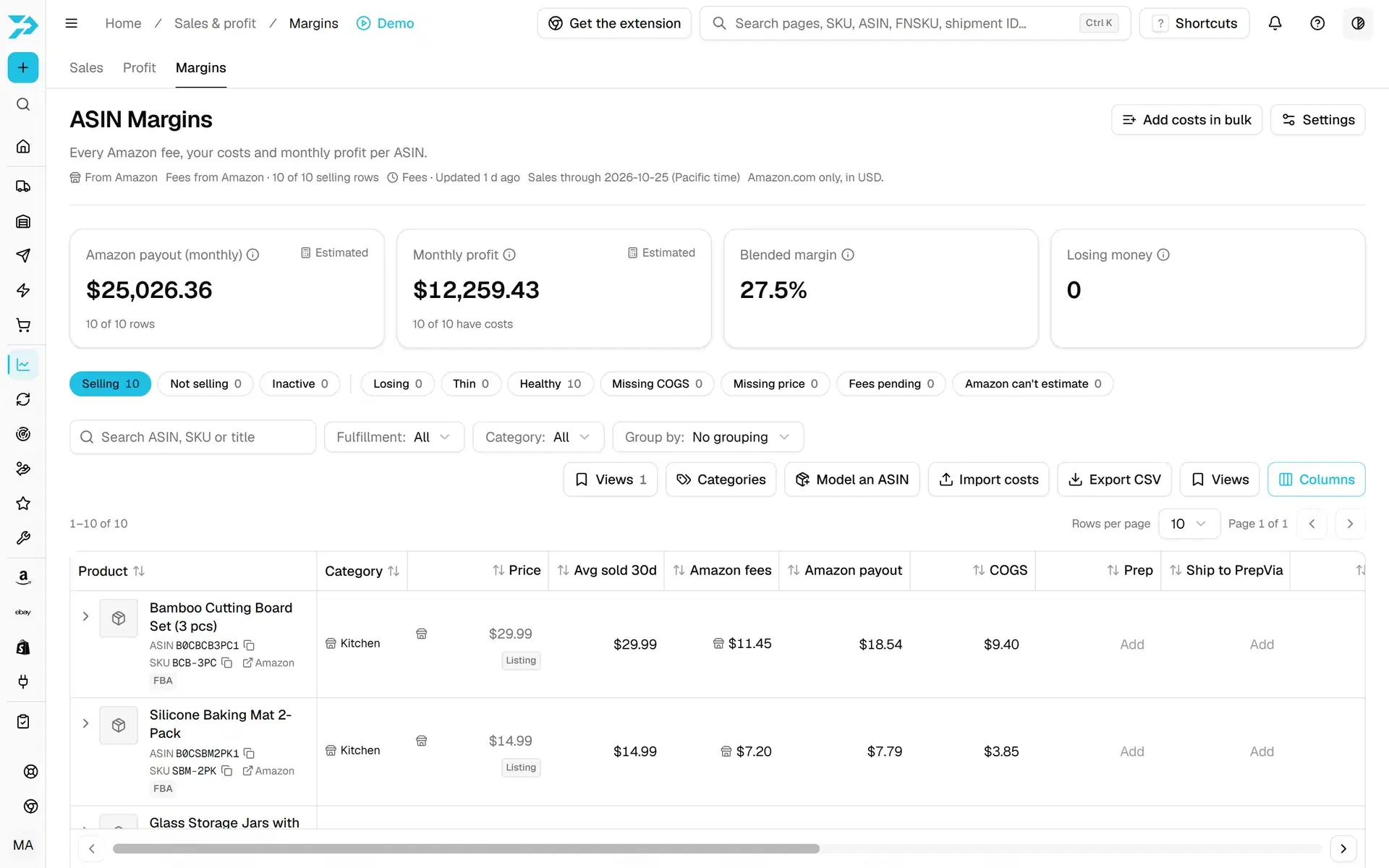
ASIN Margins
Amazon fees, your costs and monthly profit per ASIN
Questions about the PrepVia app
What is the PrepVia app?
How does the app connect to my Amazon account?
Can I see what PrepVia received?
Does the AI create products or shipments?
Which sales channels work with the app?
Is the PrepVia app on Windows?
See your own stock in the PrepVia app
Pricing is quoted per account on a free 15-minute call.
Prefer to talk it through first? Send us your operation details or see how pricing works.