FBA Prep Center vs DIY
PrepVia vs DIY FBA Prep: The Real Cost of Doing It Yourself
Rent, staff, equipment and your own hours, against a prep center that runs on its own software
Measured in the PrepVia app: a peak week of 18,080 units in 15 shipments, and a median of 30.2 hours from shipment created to carrier pickup (verified September 23, 2026)
Since January 1, 2026, Amazon no longer preps or labels FBA inventory in the US, so every seller preps in-house or uses a prep center. PrepVia preps in Miami and runs every shipment through the PrepVia app, connected to your Amazon account. Below: what DIY really costs, what replaces each job, and when doing it yourself still makes sense.
The Hidden Costs of DIY FBA Prep
Labels and poly bags are the small part. This is an example month for a seller prepping about 10,000 units in-house. Replace each line with your own numbers.
Example figures; use your own quotes.
PrepVia for the same 10,000 units:
Custom quote
No lease, staff or equipment on your side. Receiving is free. Storage is billed daily on the space your inventory uses. Terms are Net-30. No monthly fee at this volume (from 1,000 units a month). Pricing is quoted per account on a free 15-minute call. Get a quote
DIY Prep vs PrepVia: Full Comparison
The same jobs, done in your own space or at PrepVia in Miami. Every PrepVia figure comes from published company facts.
The guarantee is 35 hours end to end, from check-in at PrepVia to Amazon FBA delivered status, or the prep is free. How the clock runs is on the FastLane 35H page.
Compare your in-house numbers with a quote
Pricing is quoted per account on a free 15-minute call.
Which Approach Is Right for You?
DIY prep works for some sellers. Here is how to tell which side you are on.
When DIY Makes Sense
- Your volume fits in space you already have, with hours to spare
- You prep a few simple SKUs and like doing it yourself
- Your suppliers ship near you, far from Miami
- A few extra days to reach Amazon do not cost you sales
When Outsourcing Makes Sense
- Prep hours are cutting into sourcing, listings and marketing
- Your space and staff are the limit on how much you can send
- You would rather not manage a lease, staff and equipment
- You want counts, receipts and the Amazon status of each shipment in one app
- You want Net-30 terms instead of paying rent and payroll up front
How the Work Moves to PrepVia
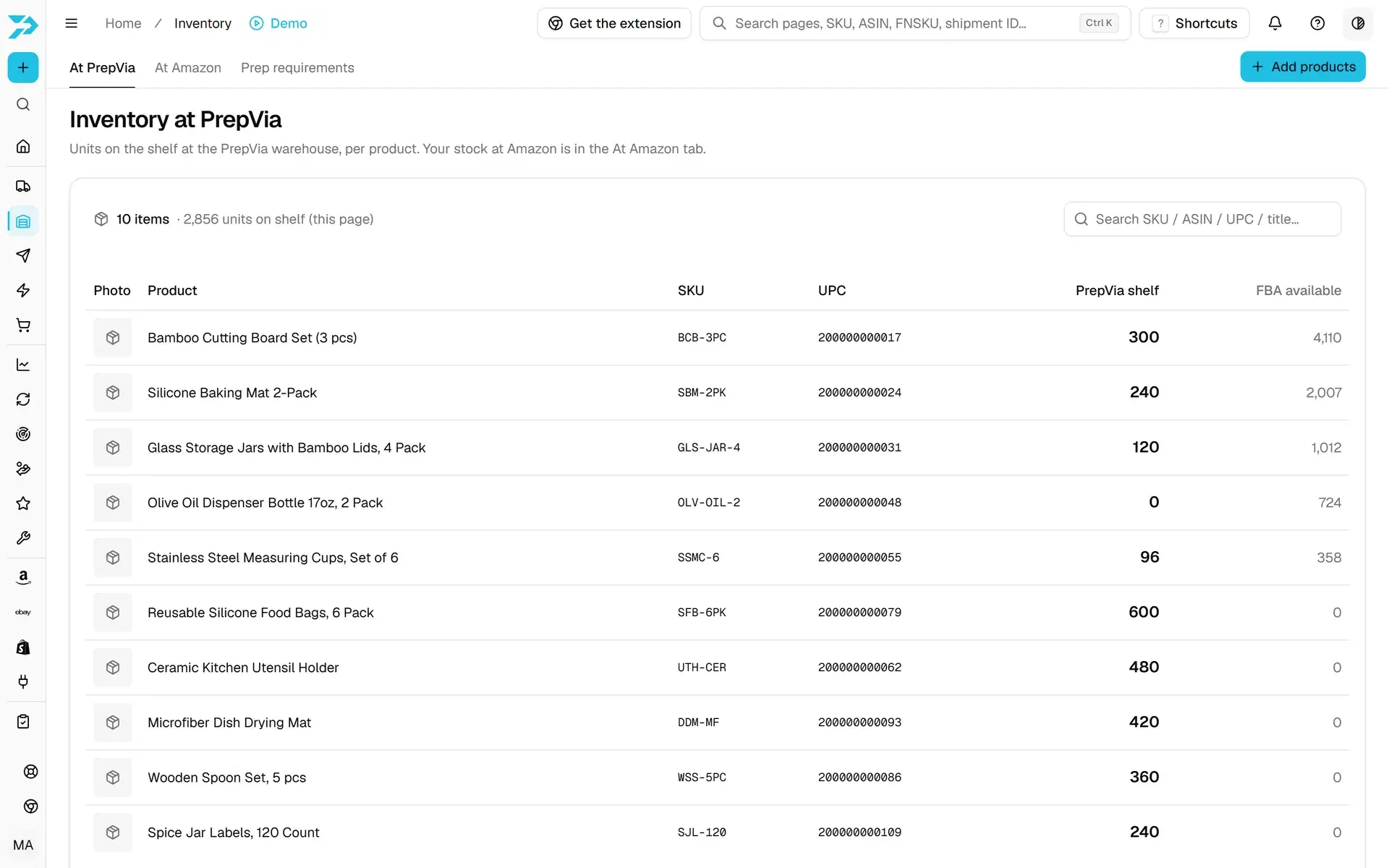
Four screens in the PrepVia app take the place of the spreadsheets, emails and Seller Central work of in-house prep.
Step 1
Tell PrepVia what is coming
In Send to PrepVia, add the products and the carrier, or send your supplier a link to fill in. With AI document reading, the AI reads an invoice or packing slip into SKUs, UPCs and quantities, and you check the list before saving.
Step 2
See what arrived
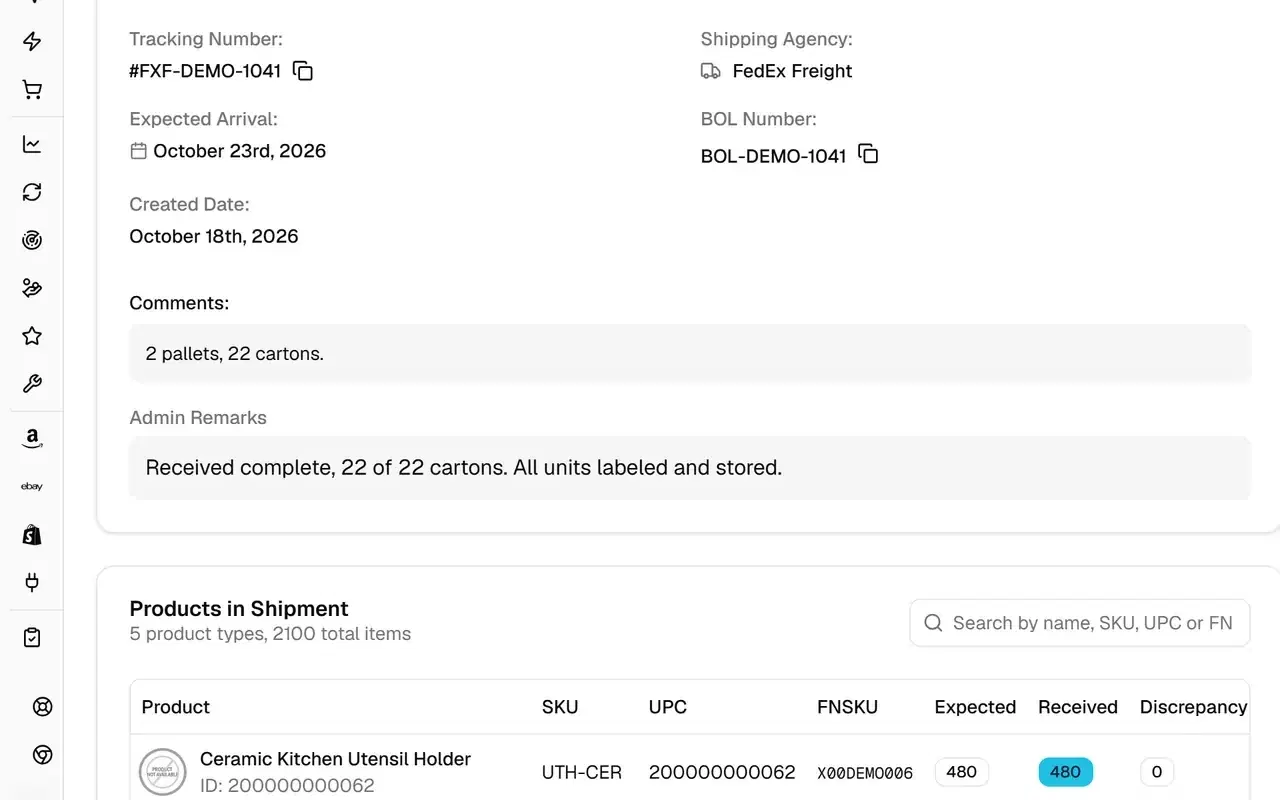
The team counts every inbound against the packing list and the BOL. Shipment tracking shows expected against received units for each product, and a warehouse receipt in PDF once the shipment closes.
Step 3
Set the prep Amazon expects
Prep requirements shows the prep Amazon has on file for each listing. Change it in the app and the change is saved on your Amazon account.
Step 4
Ship to Amazon
In Send to Amazon, pick the items and units and add prep notes. The team builds the plan through PrepVia's own Amazon SP-API integration, sends the box contents and books the freight, and you follow it until Amazon receives it.
Ready to switch? See the Amazon prep service, or how FBA prep pricing is quoted.
See how it works with your products
Pricing is quoted per account on a free 15-minute call.
Every In-House Job, Done in Miami
What you do today in your own space, and the PrepVia service or app screen that does it instead.
Printing and Sticking Labels
FNSKU labeling: Amazon's barcode on each unit, plus case pack, carton and pallet labels, scan-verified. Dated products get Expiration date labeling.
Bagging and Wrapping
Poly bagging with the suffocation warning, Shrink wrapping, and Bubble wrap for fragile items.
Building Bundles
Kitting and bundling: multi-packs and custom kits built and labeled with the kit's own barcode.
Pallets and Freight
Palletizing when a shipment needs it, and freight to Amazon on the Amazon partnered carrier program when Amazon offers it.
The Restock Spreadsheet
Restock suggests how many units to send to FBA and to reorder, per SKU, from your sales speed and the stock at Amazon and at PrepVia.
Chasing Missing Units
Reimbursements compares what PrepVia shipped with what Amazon received, every night, and keeps each shortfall as a case with its evidence, for you to file with Amazon.
PrepVia at a glance
Dated, single-source facts. The full list, including what PrepVia does not offer, is on PrepVia company facts.
- Location
- 8507 NW 72nd St, Miami, FL 33166. One warehouse, 5,500 sq ft, 3 dock doors.
- Hours
- Prep Monday to Saturday, 9 AM to 5 PM ET; dock receiving Monday to Friday, 9 AM to 5 PM ET; carrier and client pickup Monday to Friday, 12 PM to 5 PM ET
- Amazon certification
- Amazon SPN Certified, FBA Preparation
- Google reviews
- 4.8 average from 18 reviews on our Google Business Profile (verified October 27, 2026)
- Amazon integration
- Own SP-API integration: inbound plans, placement options, box content, partnered freight when Amazon offers it, and receiving status
- Prep window
- 24-36 hours
- Guarantee
- FastLane 35H: 35 hours end to end or the prep is free
- Labeling
- FNSKU, barcode and suffocation-warning labels, scan-verified
- Measured
- Best month on the dock 63,600 units (with Fastical volume); peak week 18,080 units in 15 shipments (verified September 23, 2026)
- Terms
- Net-30: pay 30 days after shipment, with approval based on your history with PrepVia. No setup fee, no long-term contract required
- Pricing
- Pricing is quoted per account on a free 15-minute call.
- Not offered
- EDI and ASN transactions, lot-level recall tracking in a WMS, FDA-registered facility, ISO certification and cold storage
DIY vs Outsourced FBA Prep: Common Questions
Is it cheaper to prep FBA inventory yourself or use a prep service?
How much time does DIY FBA prep take?
What equipment do I need for in-house FBA prep?
At what volume should I switch from DIY to a prep center?
How do I move from DIY prep to PrepVia?
Can I prep some shipments myself and send the rest to PrepVia?
Does PrepVia do the same prep I do in-house?
Ready to Stop Prepping and Start Selling?
24-36 hours prep window. Net-30 terms. No lease, staff or equipment on your side.
Amazon Prep Service · FBA Prep Pricing · Pricing & Plans · Amazon 3PL · Compare Prep Options