Miami 3PL for multichannel fulfillment and Amazon FBA prep
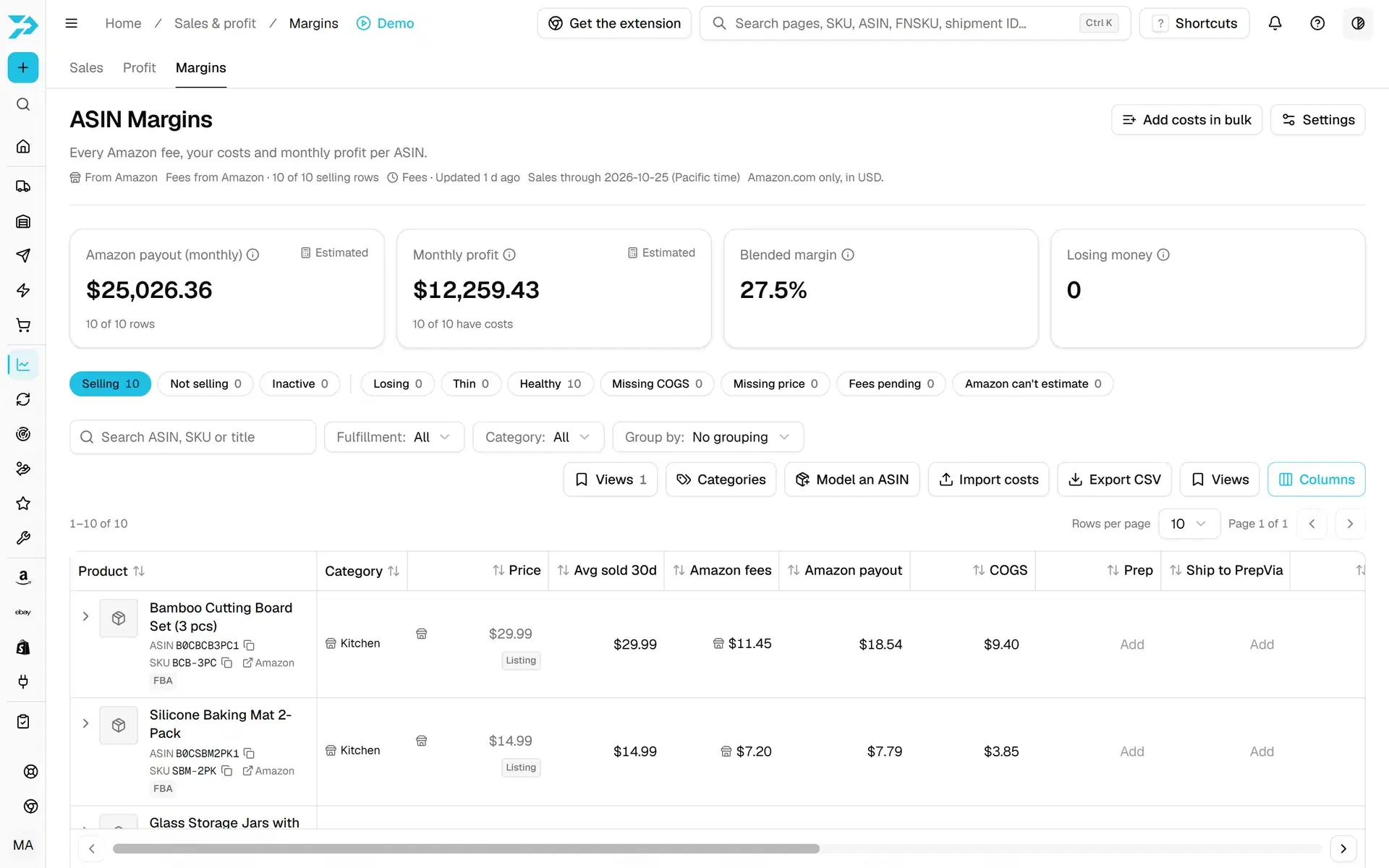
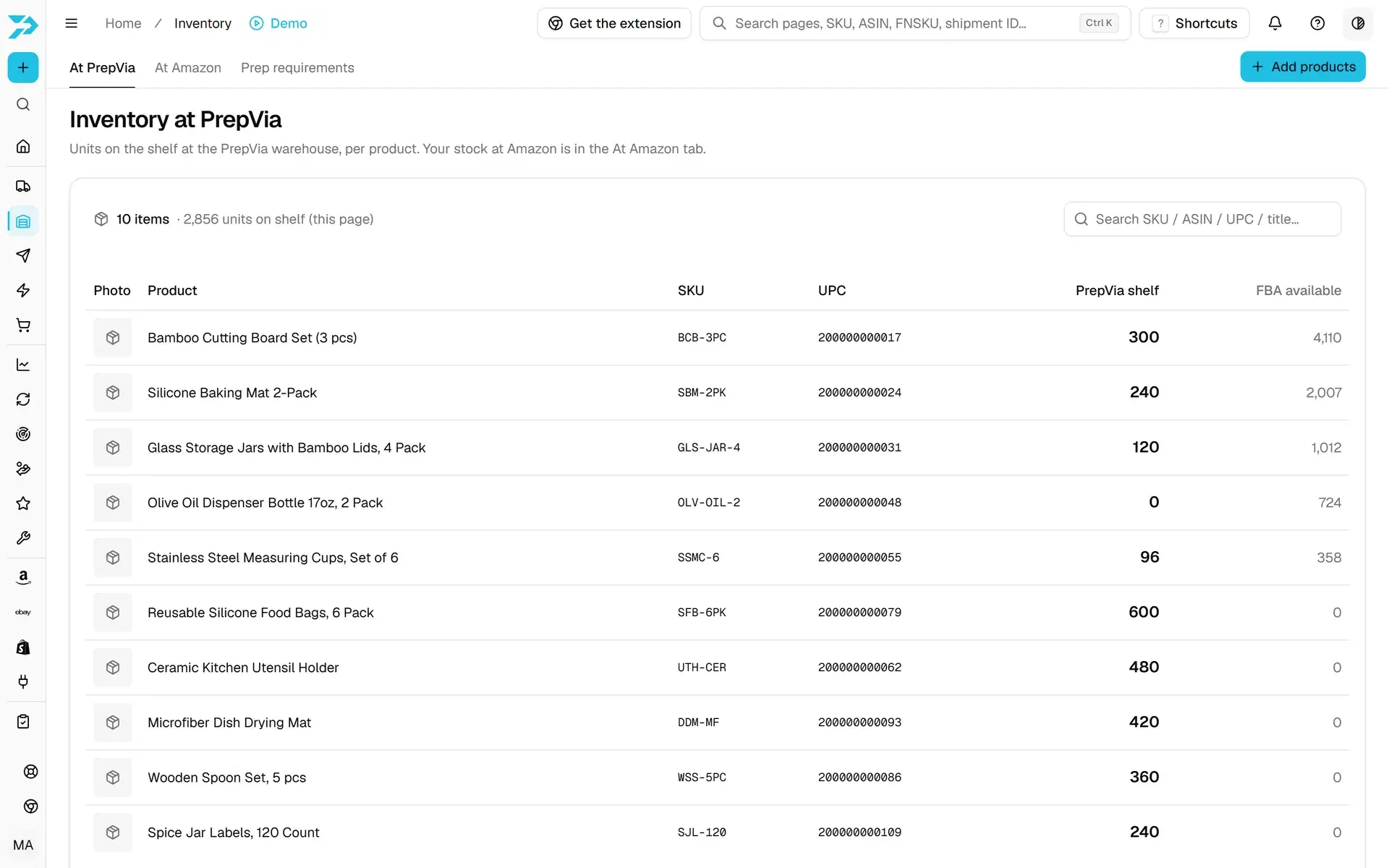
One warehouse in Miami for Amazon FBA, Walmart, TikTok Shop, Shopify, eBay, Etsy and WooCommerce. Skip the prep work at home: we receive and prep your inventory, send it to the marketplaces and ship your store orders. In the PrepVia app you see what arrived at our dock, product by product.
Pricing is quoted per account on a free 15-minute call. See how pricing works
 PrepVia App for Windows






How a shipment moves
What happens to your boxes
Each step below has its own screen in the PrepVia app, so you can follow a shipment from your supplier's tracking number to Amazon FBA or to your buyer's door.
Step 1
You tell us what is coming
Create the shipment in Send to PrepVia: where it goes (Amazon FBA, storage or another marketplace), what you are sending and how it gets here. Or send your supplier a link (Share with supplier) to fill in the tracking numbers and box contents without an account.
Step 2
We count what arrives at our Miami dock, so you know what we received
We count each product against what you told us. In Shipment Details you see Expected and Received for every product.
Step 3
You get a receipt
When the shipment closes, you download the Warehouse receipt: a PDF with the dates, what was expected, what was received and any difference per product, plus the tracking numbers and the box count.
Step 4
You choose where it goes
For Amazon FBA, pick the units in Send to Amazon. Or let Send to PrepVia create the FBA draft for eligible items. Each request moves through Working, Ready to ship, Shipped, In transit, Receiving and Closed. Store orders come into Orders from your Shopify or eBay store, a spreadsheet or a form, and ship from your stock here with a packing list and tracking.
Step 5
We prep, label and pack
Our team labels at the Label Station and checks every unit at the Check Station, which prints the FNSKU as each unit is scanned and stops at the expected count. FNSKU, box and pallet labels come off Zebra printers. For pallets, Pallet Builder shows how your boxes stack, in 3D.
Step 6
You see where it landed
In Send to Amazon, each request shows its stage, the FBA shipment ID and the fulfillment center, with the units in pipeline and the units received at Amazon, and notes from our team. Each store order shows its tracking number in Orders.
Talk to the team that runs the warehouse. Pricing is quoted per account on a free 15-minute call.
Book a 15-minute call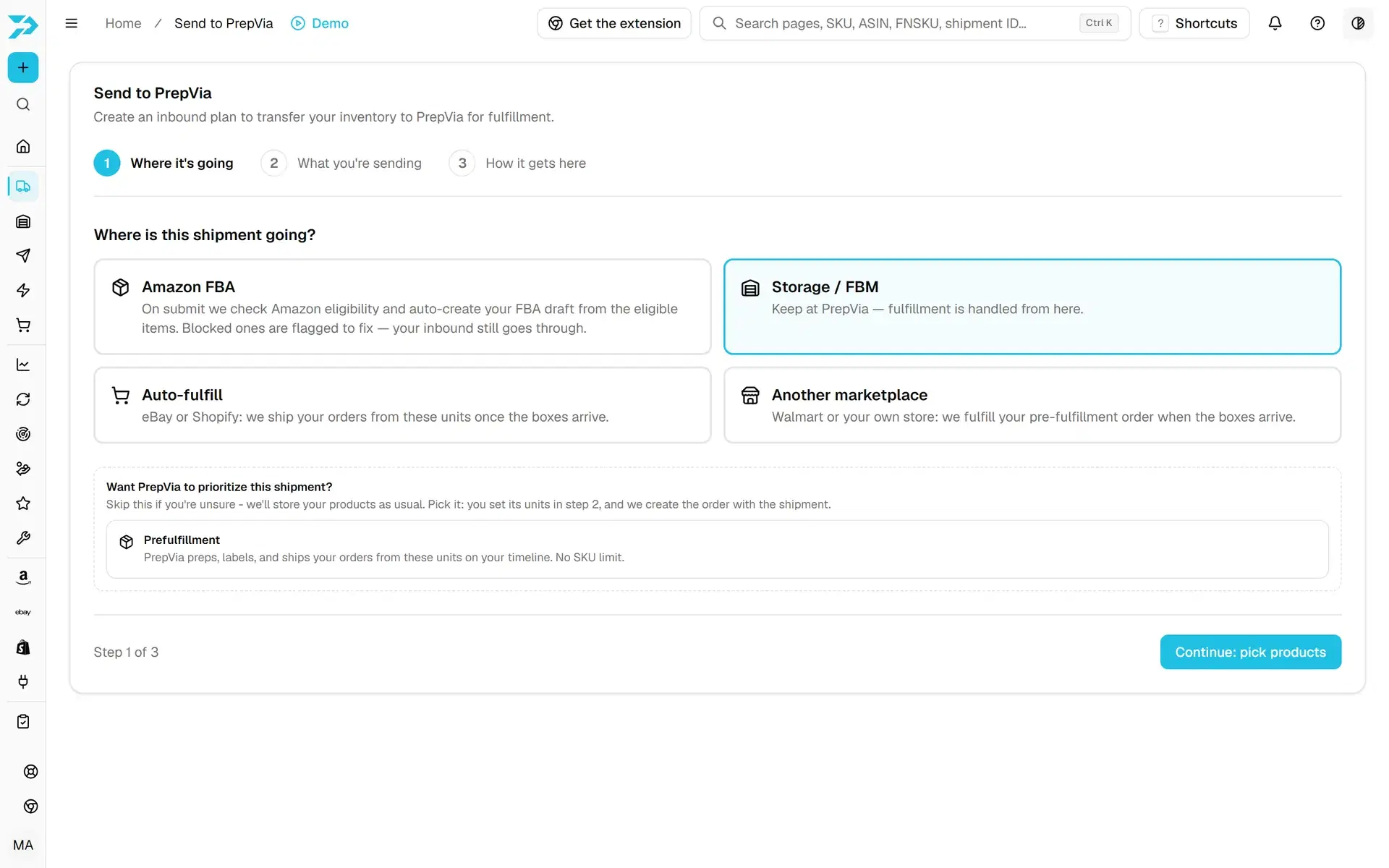
In the PrepVia app
What else is in the PrepVia app
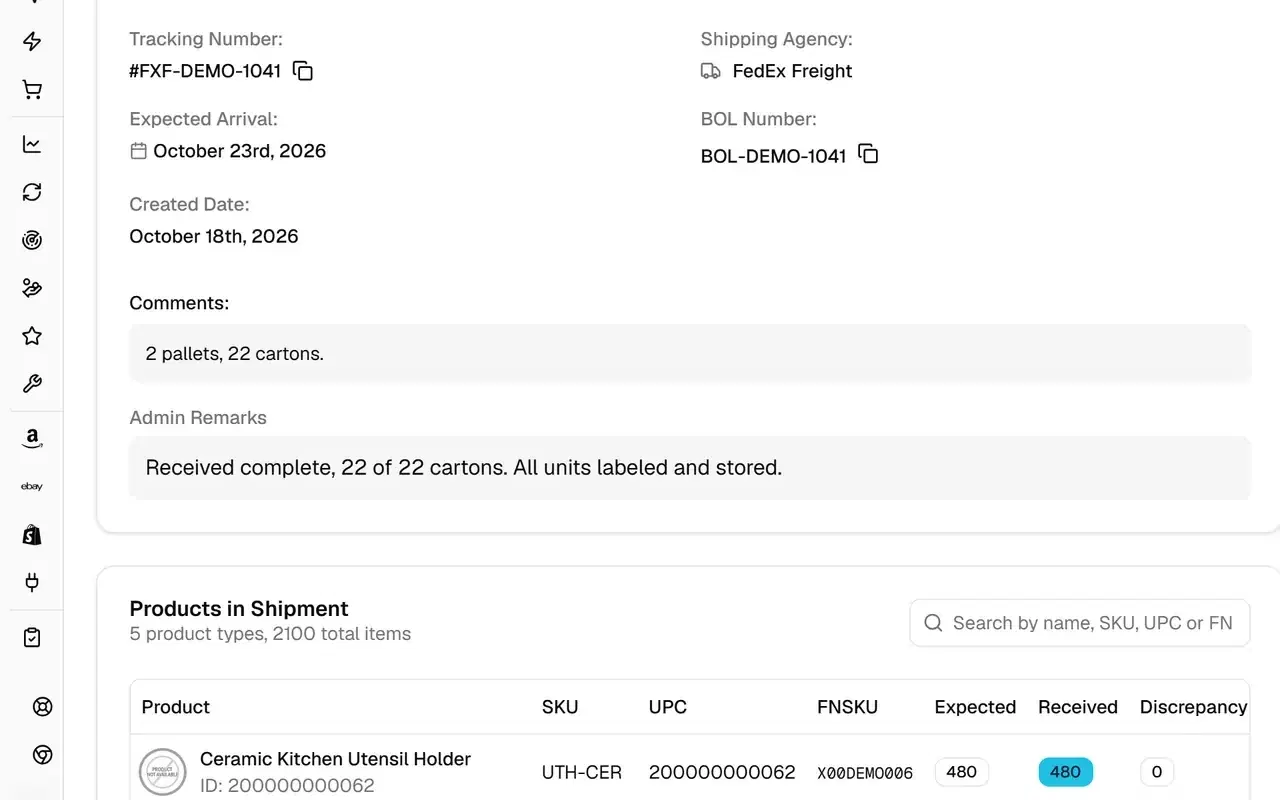
Connect your Amazon seller account. Most of these tools then read your own listings, inventory and orders. The ones marked Beta carry the same label in the app.
The PrepVia app is also on the Microsoft Store for Windows. Install it and sign in with your PrepVia account.
Stock and listings
Sales and reviews
Orders and billing
Also in the app: support tickets and your shipment history.
See the PrepVia appSee how we prep and ship your products
Pricing is quoted per account on a free 15-minute call.
What sellers say on Google
4.8average from 18 reviews on our Google Business Profile (verified October 27, 2026).
Three of them, as written:
“I’ve been using PrepVia for my logistics and prep needs and couldn’t be happier. Super reliable team, fast turnaround, and great communication throughout the process. They really helped streamline things and made everything way easier than I expected. Highly recommend!”
Christopher L., Google review
“Excellent experience with PrepVia. The operation is extremely organized, fast, and reliable. Everything is handled with great attention to detail, which makes a big difference for anyone working with FBA and needing accuracy in product preparation and shipping. The team is professional, responsive, and handles any request efficiently. It gives you confidence that your logistics are in good hands. Highly recommended for anyone looking for a serious and well-structured partner.”
Martins T., Google review
“Such a great prep center, extremely organized and great communication.”
Gabriella R., Google review
PrepVia at a glance
Dated, single-source facts. See the full list, including what PrepVia does not offer, on the PrepVia company facts page.
- Guarantee
- FastLane 35H: 35 hours end to end or the prep is free
- Location
- 8507 NW 72nd St, Miami, FL 33166. One warehouse, 5,500 sq ft, 3 dock doors.
- Hours
- Prep Monday to Saturday, 9 AM to 5 PM ET; dock receiving Monday to Friday, 9 AM to 5 PM ET; carrier and client pickup Monday to Friday, 12 PM to 5 PM ET
- Amazon certification
- Amazon SPN Certified, FBA Preparation
- Google reviews
- 4.8 average from 18 reviews on our Google Business Profile (verified October 27, 2026)
- Amazon integration
- Own SP-API integration: inbound plans, placement options, box content, partnered freight when Amazon offers it, and receiving status
- Prep window
- 24-36 hours
- Labeling
- FNSKU, barcode and suffocation-warning labels, scan-verified
- Measured
- Best month on the dock 63,600 units (with Fastical volume); peak week 18,080 units in 15 shipments (verified September 23, 2026)
- Terms
- Net-30: pay 30 days after shipment, with approval based on your history with PrepVia. No setup fee, no long-term contract required
- Pricing
- Pricing is quoted per account on a free 15-minute call.
Prep services for Amazon and multichannel sellers
We prep your inventory at our warehouse, so you don't have to. These are the prep services we run.
Most of them have a page of their own on the services page. Start with the Amazon FBA prep center, the Amazon prep service or the 3PL for Amazon sellers, see the dock on the FBA prep center in Miami page, and for speed, FastLane 35H.
Labels and stickers
- FNSKU labeling
- Expiration date labeling
- Sticker removal
- Promo stickers
Kits, packs and boxes
- Kitting and bundling
- Case packs
- Inserts
- Custom and branded boxes
- Repacking
Inspection, returns and pallets
Not sure which ones your products need? We check them with you on the call.
Meet the Founder
Built by a Seller,
for Sellers
Bernardo Campelo built PrepVia after Fastical, his wholesale company, kept running into delays, mistakes and zero visibility at the prep centers it shipped to.
One 3PL to receive, prep and ship for the channels you sell on
Marketplaces




Your own store

Distribution and import
Tools, integrations and playbooks for Amazon and multichannel sellers
Services, the PrepVia app, programs, tools, integrations, solutions by seller model, comparisons and Amazon rule playbooks.
Tools
Free calculators, the Chrome extension and the tools of the PrepVia app, from Restock to Pallet Builder.
- ServicesEvery PrepVia service: Amazon FBA prep and labeling, storage, palletizing, freight, D2C fulfillment and returns.
- SimulationYour next FBA shipment at PrepVia and at a typical prep center: the time at the prep center, each step side by side, and what each one includes.
- The PrepVia appSend to PrepVia, shipment tracking with expected against received per product, Send to Amazon through PrepVia's own SP-API integration, and the tools of the app.
- PrepVia programsFastLane 35H, pre-fulfillment, PrepVia Profits, Refer & Earn and the other programs, with everything PrepVia does in one list.
- Sourcing AssistantChrome extension for PrepVia customers: Amazon fees, profit, ROI and whether your account can sell the item, on Amazon.com product pages.
- IntegrationsAmazon SP-API, Shopify, eBay and QuickBooks connect to the PrepVia app. Walmart, TikTok Shop, Etsy and WooCommerce are channels PrepVia serves, with orders created in the app.
- SolutionsEach way of selling, from wholesale and brands to aggregators and agencies, with the services and app screens that handle it.
- ComparePrepVia next to other prep centers and next to doing it yourself, using what each side publishes.
- PlaybooksAmazon's 2026 rule changes for FBA sellers, read from Amazon's own pages, with the steps to follow.
Latest Insights
Strategy and operations for Amazon and multichannel sellers, written from the warehouse floor by the PrepVia team.
Amazon Ungating at Catalog Scale: Check Every ASIN at the PO and Again Before the Inbound
Amazon approvals can change after you buy. Check every ASIN at the PO and before the inbound, read the restriction codes, and plan for stranded units.
- Guide
How to Set Up Amazon Business as a Brand or Distributor
How to set up Amazon Business as a brand or distributor: business prices, quantity tiers, the 3% rule behind two fee discounts, Business Deals and case packs.
October 29, 2026 - Multichannel
Beyond Amazon
Walmart, Target Plus, TikTok Shop, eBay and Mercado Libre each publish a different gate. How an Amazon brand can order them by what its operation proves.
October 29, 2026 - Multichannel
Amazon Can Ship Your Walmart Orders and Walmart Can Ship Your Amazon Orders
Amazon MCF can ship Walmart orders and Walmart MCS can ship Amazon orders, each under the other marketplace's rules. Here is where the shared stock should sit.
October 29, 2026
Book a Free Consultation
Pick a time that works for you. We'll walk through your operation and build a custom plan, with no commitment.
Pick a date and time below
Book a call with PrepVia
15 minutes on Zoom: bring your volume, leave with a plan and a quote
Weekdays, 10 AM to 5 PM Eastern (New York)
Loading open times…
Or email contact@prepvia.com · call +1 (855) 919-2290
- No setup fee, no minimums
- 24-36 hours prep window
- Your stock at PrepVia and at Amazon in one app
- FBA- and FBM-compliant packaging
- Pricing quoted per account on a free 15-minute call
Or send us an inquiry and we'll get back to you.