
Chrome extension for Amazon.com
PrepVia Sourcing Assistant
A Chrome extension for PrepVia customers. On an Amazon.com product page it shows Amazon's fees, your payout, profit and ROI at the cost you type, whether your account can sell the item, the Buy Box and the sales rank. The numbers come from your own Amazon seller account connected to PrepVia.
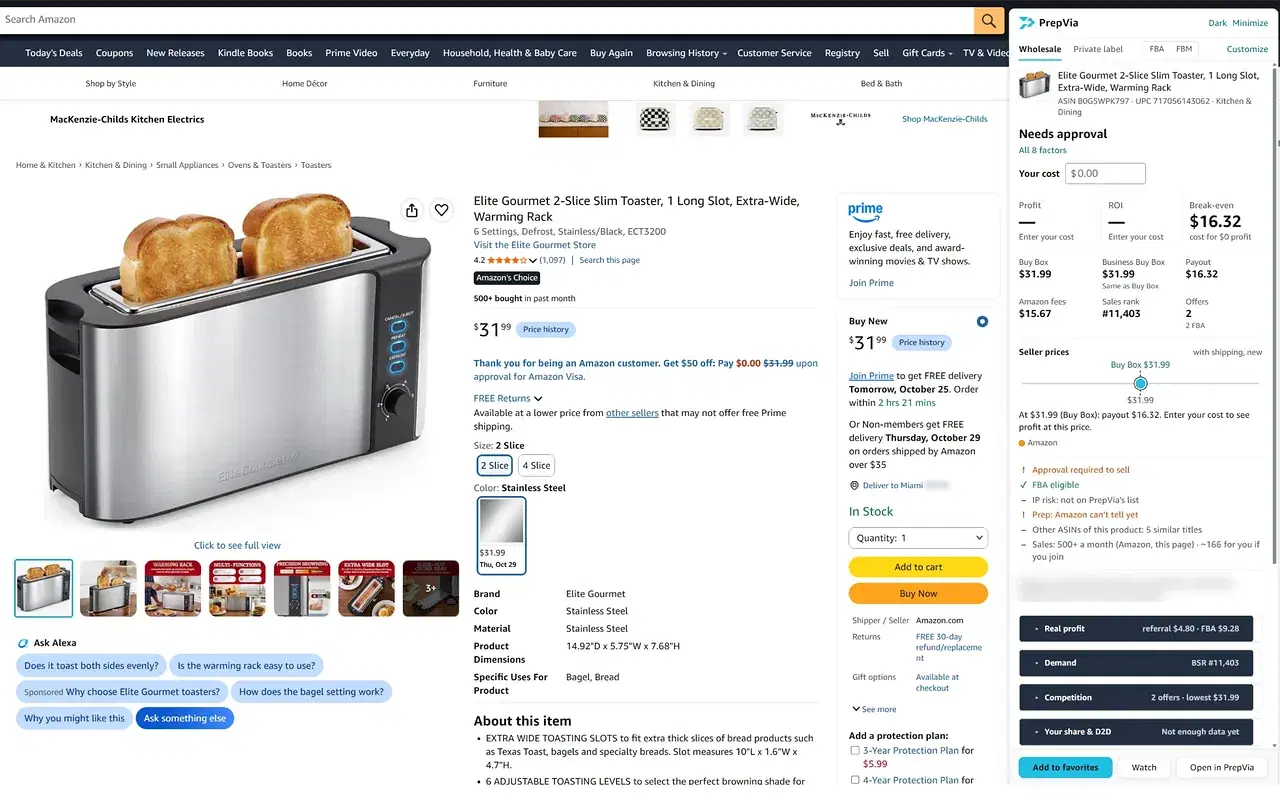
What the panel shows on a product page
Fees and payout
Amazon's referral and FBA fees for the item and your payout at the Buy Box price, or at a sale price you type, for your own seller account.
Profit, ROI and break-even
Type your unit cost and see the profit and ROI, plus the break-even cost: the most you can pay for the unit and still not lose money.
Can your account sell it
Whether your account can sell the item or needs approval first, and whether the item is eligible for FBA.
Risk flags
Hazmat and battery flags, meltable dates, whether Amazon requires prep, and whether the brand is on PrepVia's IP risk list.
Buy Box and offers
The Buy Box, the Amazon Business price when the item has one, the number of offers and where each seller's price sits.
Demand
The Best Sellers Rank and Amazon's own "bought in past month" line from the page.
Other listings of the same product
Other ASINs with the same UPC or a similar title, so you can compare the price per unit before you buy.
Save to PrepVia
Watch a product, add it to a list or collect the ASINs of a page into your PrepVia account.
On search and Best Sellers pages
With "Show PrepVia data on search pages and recommendations" on, which is the default, the extension puts one line under each result near your screen on search, browse, Best Sellers and shopping pages: the sellers, the Buy Box and the sales rank. That covers up to 50 results per page and up to 30 products in the carousels between them. You can turn it off in the extension's popup.
The profit math
You type the cost. The rest comes from Amazon for your account.
Payout = sale price minus Amazon's fees (referral fee and FBA fee)
Profit = payout minus your unit cost
ROI = profit divided by your unit cost, times 100
Break-even cost = the unit cost at which the profit is zero, which equals the payout
Your account, your data
The extension works only after you connect it to your PrepVia account, and only on Amazon.com. Amazon data in the panel comes from your own Amazon authorization or from the page you are viewing, and is never shown to another PrepVia customer. PrepVia does not sell or transfer extension data, and the extension never changes your Amazon delivery ZIP code. The full description is in section 13 of the privacy policy.
| Chrome permission | Why the extension asks for it |
|---|---|
| Amazon.com pages | Reads the product ID and the page lines listed in the privacy policy, to place the panel and the line under search results. |
| api.prepvia.com | Asks PrepVia's server for the Amazon data of your own connected seller account. |
| storage | Keeps your settings, your connection token and the costs you type, in your browser. |
| activeTab and scripting | Used only when you click "Collect ASINs on this page" in the popup, to read the product IDs of that one Amazon page. |
How to get it
- Add it from the Chrome Web Store.
- Connect it to your PrepVia account from the extension.
- Connect your Amazon seller account in the PrepVia app, if it is not connected yet.
- Open any Amazon.com product page.
Not a PrepVia customer yet? Pricing is quoted per account on a free 15-minute call. Get a quote.